

The number one challenge facing business owners is the same as it’s always been: attracting and hiring the right people. But today, technology exists to make this process a whole lot easier. And, even better, you don’t need to be a seasoned HR professional to enjoy the benefits of these tools.
If you’re looking to make your hiring process more efficient and organized, you need an applicant tracking system (ATS) — a software that helps you recruit, hire, and onboard candidates quickly and easily. Let’s learn more about what an ATS is and what your hiring process could look like with an ATS.
What is an ATS?
An applicant tracking system is a type of software that organizes and automates one of the most crucial business functions: finding and hiring the right people.
An ATS helps you distribute your job postings and serves as a centralized hub that automatically collects and stores everything applicants send you, such as resumes, cover letters, or samples of work. Submissions come with assessment scores and answers to pre-qualifying questions attached to help you evaluate candidates efficiently. Plus, you can schedule interviews and manage your communication with applicants all in the same place.
An ATS streamlines hiring from start to finish – from job description to job offer.

Applicant tracking system benefits
1. Save time on repetitive hiring tasks
Gone are the days when you have to manually distribute your open jobs online, print out PDFs of resumes to store at your desk, play phone tag with potential candidates, and scramble to get the proper documents in order when you finally make a hire.
With an ATS, you can just log in to your dashboard, sit back, and watch the applicants come through — with all their information automatically laid out in front of you, neatly organized in their individual hiring workflows.
An ATS enables fast and easy electronic handling of a business’s recruitment and hiring needs and automates the tedious parts of hiring like candidate evaluation and communication. Less time spent on the administrative tasks that come with hiring equals more time to focus on other parts of your business.
2. Host an attractive careers page
Every year, CareerPlug analyzes hiring activity from more than 16,000 companies as part of our Recruiting Metrics Report. Our data shows that company careers pages are an underutilized, but high quality source of applicants.
In the most recent report, we found that an applicant who applied directly from a company careers page was 3.5 times more likely to be hired than an applicant from a job board.
Careers pages allow you to showcase your employer brand better than you could on a generic job board. And they help job seekers to learn more about your business, culture, and values before they decide to apply to your role.
A good applicant tracking system should give you the ability to create an attractive careers page like the one below for CareerPlug client, Pizza Inn:

3. Make it easy to apply from any device
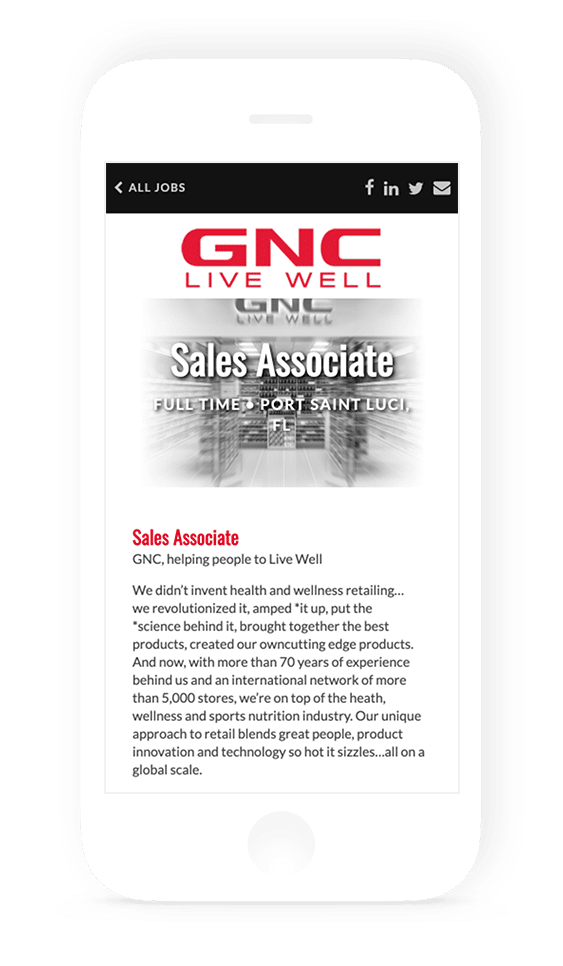
Job seekers are busy, and they want looking for their next opportunity to be just as convenient as shopping online for a new pair of shoes. It’s estimated that nearly 90% of job seekers use a mobile device during their job search, so making sure that your application is mobile friendly is pretty important.
An ATS can provide you with the functionality and integrations you need to present job seekers with a fast, easy application — even from their mobile devices.
Keep this in mind: the best candidates can afford to be picky about which jobs they apply to. If a job application is inconvenient, they will have no qualms about moving on.
4. Communicate with candidates more efficiently
We mentioned how an ATS helps eliminate the administrative tasks involved in the hiring process, and that extends to communication. With an ATS, you email or text candidates directly without leaving the software.
One pain point we hear from hiring managers is the time they waste trying to get in touch with applicants who never get back to them. Luckily, research shows that text messages have a 98% open rate compared with email, which has a 20% open rate. Plus, 81% of job seekers we surveyed said that text recruiting is equally as professional as email.
Text recruiting can help you stay top of mind and keep more candidates engaged in your hiring process. Watch the video below for a fun example of text recruiting in action:
5. Automate interview scheduling to hire faster
Another big way that an ATS can save you time is with automated interview scheduling. With automated interview scheduling, you sync your calendar to your ATS; candidates receive a link to schedule an interview at a time that works for them based on your availability.
Automated interview scheduling is a game changer for both busy candidates and busy managers as it eliminates the endless back and forth of playing phone tag or sending emails to find a time that works for both of you.
CareerPlug’s President, Jenny Leman uses our automated interview scheduling tool, Autopilot to save time in her own work day. In the video below, she explains how much of an impact it’s made:
6. Post your job to all the major job boards at once
Job seekers don’t search for jobs in just one place and there’s no shortage of job boards out there. But as an employer, do you really want to spend all day managing your job postings on all these sites? Of course not.
Job posting software will allow you to, with a single click, post your jobs to all of the major job boards like Indeed, ZipRecruiter, Glassdoor, and more, as well as your own company careers page and any other custom sources you’ve defined. ATS users often report seeing an immediate boost to their applicant pipelines.

7. Track your applicant sources
There’s no question which sources produce the most applicants: major job boards like Indeed and ZipRecruiter. But when it comes to hiring, quality matters more than quantity.
Our research finds that while job boards produce 63% of all applications, they produce only 36% of hires. Companies that rely solely on job boards are likely to find that the applicants they receive are less responsive and not as high-quality as applicants generated through other means.
An applicant tracking system will aggregate all your applicants into one place (your dashboard), but it can also allow you to track your applicant sources so you can identify which are the most effective for your business. That way you can focus your energy (and potential advertising spend) on the sources that produce quality hires.

8. Fast track your best candidates instantly
When you begin using an applicant tracking system, you’ll likely start to see your applicant pipeline increase — which means you’ll now find yourself sorting through more candidates than ever before. Sounds great, right? Well, there’s a downside to this – now you have more applicants to evaluate in your search for the perfect person for your role.
An applicant tracking system should save you time while also helping you make better decisions about which applicants to move forward. With CareerPlug, you can add pre-screen questions to your application to automatically fast-track applicants who meet your most important requirements and remove unqualified applicants from your pipeline. By identifying top candidates quickly, you can contact them sooner, keep them engaged, and turn them into hires.

9. Evaluate candidates using the same measurable, objective criteria
An ATS discourages hiring based on “gut feelings” by providing the rubric to evaluate all candidates fairly and consistently. An applicant tracking system can help you measure objective criteria using tools like role-specific scorecards and candidate assessments.
Assessments can help you test whether a candidate has the qualities you’re looking for and that they can demonstrate the skills they’ve listed on their resume or in their application. With CareerPlug’s built-in assessments, you can test a candidate’s math and verbal skills, as well as personality traits. Once a candidate completes an assessment, you can see how their skills break down into different areas:

One major bonus: by sticking to data-driven decisions with the help of an ATS, you can begin to reduce unconscious bias in hiring. Evaluating all candidates fairly is a great first step toward increasing your organization’s diversity — and there’s plenty of evidence that proves diverse companies perform better.
10. Create an easily repeatable hiring process for your business
You want to be able to make great hires consistently to keep your business running smoothly. Another huge benefit of using an ATS, is that it makes it easy to build and follow a consistent hiring process.
A consistent hiring process empowers anyone on your team to make better hires by following a proven playbook of best practices. It makes it easy to stay compliant with no missed steps, and creates a better experience for candidates.

11. Create a great candidate experience
Many of the things we’ve already covered are about how an ATS makes your life easier as a hiring manager or business owner. But, guess what – those same things make candidates’ lives easier, too!
Candidate experience matters. We found that 49% of job seekers had declined a job offer due to poor experience. This proves that the impression you make on candidates during a hiring process is important.
Job seekers are busy, too. They want an easy application, prompt and frequent communication, and transparency and respect throughout the process. An ATS allows candidates to hear from you sooner, schedule interviews on their own time, and stay informed regarding where they stand in your hiring process.
Creating a positive candidate experience is a good look, that shows your company is organized, thoughtful, and respectful of job seeker’s time. This builds a strong employer brand and makes it much more likely that candidates will say yes to your job offers.
12. Complete onboarding paperwork digitally using a compliant system.
Did you know businesses can be subject to potential fines for filling out employment forms incorrectly?
An ATS takes the pain out of new hire forms by going completely paperless. CareerPlug’s software gives you the tools to be compliant with your onboarding paperwork. It provides you with a digitized W-4, and any state-specific tax forms.
Digitized forms require that candidates fill out and sign all the necessary fields before they can proceed. When combined with a review by the hiring manager, this can reduce your risk of submitting incorrect or incomplete forms.
Lastly, all completed forms are stored electronically in a secure and compliant environment. Your new hire can hit the ground running after a seamless, worry-free onboarding.
Choosing an ATS system: what to actually compare
Most small business owners we talk to don’t need another feature list — they need to know which two or three things will actually make or break their hiring. We’ve worked with 16,000 small businesses at this point, and the pattern is pretty consistent: if an ATS gets the candidate experience, the integrations, and the support model right, the rest mostly sorts itself out.
Here’s a short framework for comparing systems without getting lost in the brochure.
What to look at when you compare ATS options
| What to compare | What actually matters | Why it matters |
|---|---|---|
| Careers page | Is it mobile-friendly and branded to your company, or does it look like a generic job board form? | Applicants from company careers pages are 3.5× more likely to be hired than applicants from job boards (our Recruiting Metrics Report). |
| Job board distribution | Does it post to Indeed, ZipRecruiter, Glassdoor, and your own page in one click? | Job seekers don’t search one place. If you’re managing postings site-by-site, you’ll quit doing it. |
| Automated interview scheduling | Can candidates self-schedule based on your calendar? | Phone tag is where most pipelines die. Self-scheduling usually saves 3–5 hours per hire. |
| Pre-screen questions & scorecards | Can you fast-track qualified candidates and score interviews consistently? | This is what keeps hiring quality steady when multiple managers interview. |
| Onboarding paperwork | Does it include digitized, compliant W-4, I-9, and state tax forms? | Paper onboarding is where small businesses pick up fines. |
| Integrations | Does it connect to your payroll, HRIS, and background check vendor? | Re-entering data across systems is a tax on every hire. |
| Support model | Do you get a real person, or a help center? | The system is only useful if you actually set it up. Support-during-implementation predicts whether a team sticks with it. |
| Pricing | Flat per-location, per-user, or per-hire? | For multi-location and franchise operators, per-user and per-hire pricing can get expensive fast — per-location is usually cleaner. |
What isn’t worth obsessing over
The feature lists between the top five or six systems look pretty similar. AI resume parsing, one-click postings, text messaging — most vendors have a version of all of it. What varies is how usable the software is on a Tuesday afternoon when you’re short-staffed and trying to cover a shift. If you can, get a demo where you actually post a job and schedule an interview inside the product. A 45-minute demo tells you more than any comparison chart.
Who an ATS is for
An ATS makes sense for any business that’s hiring more than a handful of roles a year, has multiple people involved in interviews, or operates across more than one location. If you’re a one-location business hiring two people a year, a spreadsheet and a job board probably still works. Everyone else starts losing good candidates to slow or inconsistent processes, and that’s the tax the ATS removes.
Frequently asked questions about applicant tracking systems
What does ATS stand for?
ATS stands for Applicant Tracking System. It’s software that automates and organizes the hiring process, from job posting through onboarding.
How does an applicant tracking system work?
An ATS takes applications from your job postings, stores them in one dashboard, screens them against questions or assessments you set up, and helps you move candidates through your hiring process — from first review to interview scheduling to signed offer letter. Most systems also handle communication (email and text), background checks, and onboarding paperwork.
Do small businesses really need an ATS?
Honestly, if you’re hiring a handful of people a year and you’ve got one person handling all of it, you can get by with spreadsheets and email. But the moment you’re hiring across multiple locations, multiple managers, or more than ten or fifteen roles a year, you start losing good candidates to the gaps — missed emails, slow responses, inconsistent interviews. An ATS is what closes those gaps.
What’s the difference between an ATS and an HRIS?
An ATS handles hiring — posting jobs, evaluating candidates, making offers. An HRIS (Human Resources Information System) handles everything after hire — payroll, benefits, time off, performance reviews. Most small businesses need both, and the good ones integrate with each other so you’re not re-entering data.
How much does an ATS cost for a small business?
ATS pricing runs from free (limited) to several hundred dollars per month. Most small-business-focused systems price per location or per user, often somewhere between $99 and $299 per location per month. Enterprise systems can run significantly higher. Watch for setup fees, per-hire fees, and add-on costs for things like background checks or text messaging.
Will an ATS automatically reject my resume?
Applicant tracking systems used by large companies can auto-filter resumes based on keyword matching. Small-business ATS platforms (including CareerPlug) are different — they don’t auto-reject; they help hiring managers prioritize. The decision stays with the human.

Ready to see an ATS in action?
Our software is easy to use, but powerful. It’s built on a proven process that’s helped 16,000 small businesses make the right hires. Click the button below to get a demo of CareerPlug and see for yourself how we make hiring easier.
GET A DEMO